10 Best Cartoon Style Prompts for Nano Banana Pro: Generate Any Animation Style You Want
Master 10 iconic cartoon styles with proven AI prompts. From Pixar 3D to vintage rubber hose animation - transform your photos into stunning cartoon art!
Whether you're a content creator, animator, designer, or just someone who loves bringing imaginative characters to life, mastering the art of AI image prompts can unlock endless creative possibilities. Today, we're sharing 10 carefully crafted prompts that cover a stunning range of cartoon and animation styles — from classic rubber hose animation to modern 3D CGI renders.
But here's the best part: We're not just giving you the prompts. We're showing you exactly how to customize them for your own projects, explaining the key elements that define each style, and breaking down the cartoon aesthetics that make each one unique.
Types of Cartoon Styles for AI: Quick Comparison
Not sure which of the different cartoon styles for AI prompts fits your project? Use this comparison table to scan all 10 styles at a glance, then jump to the full prompt for the one that matches your vibe.
| Style | Signature Look | Best For |
|---|---|---|
| Adult Cartoon Sitcom | Flat colors, bold outlines, satirical tone | Meme content, YouTube thumbnails, character mockups |
| Monochrome Manga | Black-and-white ink, screentone shading, dynamic action | Action scenes, comic panels, fan art |
| Ligne Claire (Clear Line) | Uniform line weight, flat color fills, no hatching | Editorial art, travel posters, clean portraits |
| Thick-Line Vector / Street | Heavy outlines, saturated colors, urban energy | Stickers, streetwear graphics, logos |
| Claymation / Stop-Motion | Sculpted clay texture, fingerprint detail, soft studio light | Quirky characters, product mascots |
| Rubber Hose (1930s) | Noodle limbs, pie-cut eyes, vintage film grain | Retro branding, nostalgic poster art |
| 3D CGI / Pixar Style | Soft global lighting, expressive eyes, cinematic depth | Family avatars, storybook scenes |
| Paper Cut-Out | Layered card stock, visible edges, handcrafted depth | Children's book art, collage posters |
| Vinyl Toy / Collectible | Glossy surfaces, chibi proportions, clean studio render | Designer toy mockups, profile pictures |
| Ballpoint Doodle | Sketchy pen strokes, notebook-margin charm | Personal journals, lo-fi social posts |
A quick rule of thumb when choosing between these types of cartoon styles for AI art: 2D styles (manga, ligne claire, rubber hose) read best at small sizes and feel more "drawn," while 3D styles (Pixar-style CGI, claymation, vinyl toy) add depth and polish that suits avatars and hero images. Mixed-media looks like paper cut-out sit in between — distinctive, but more sensitive to prompt wording.
The 10 Cartoon Style Prompts
1. Contemporary Adult Cartoon Sitcom Style
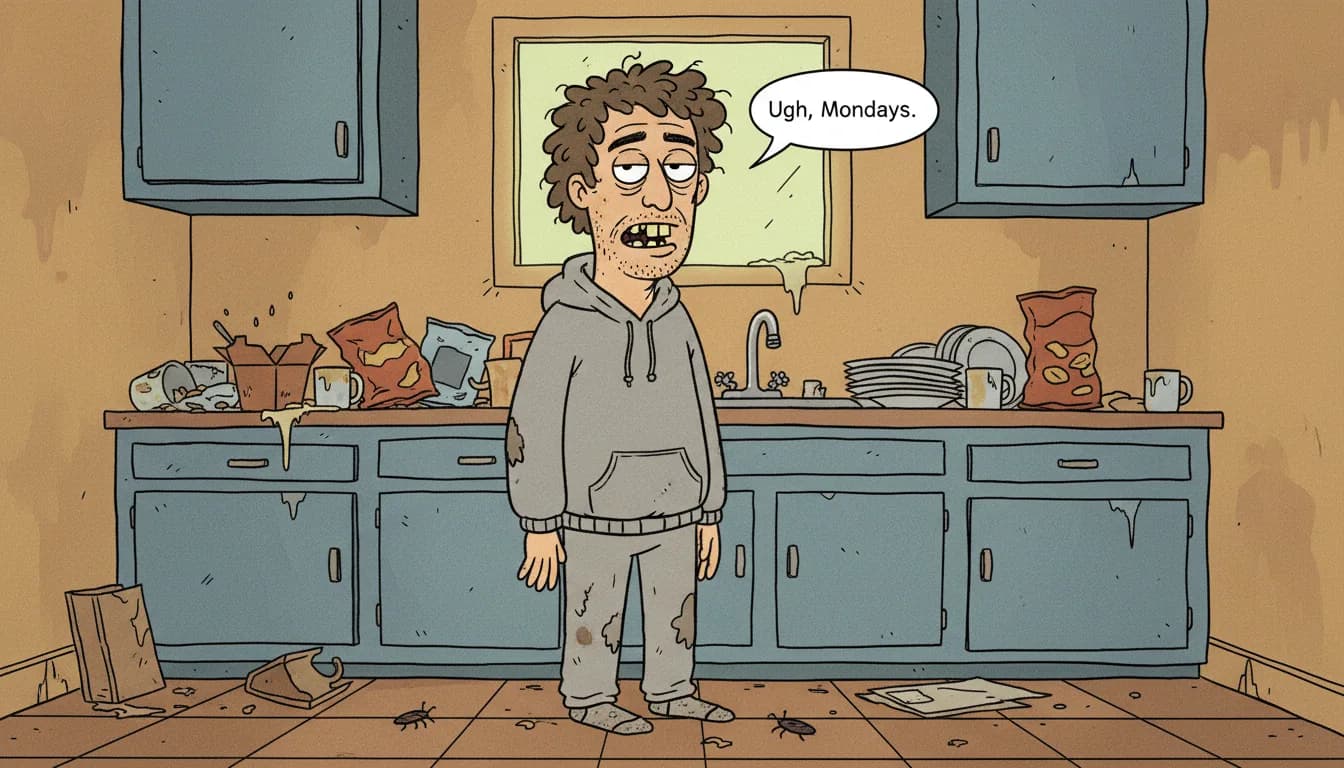
Think Rick and Morty, BoJack Horseman, or Big Mouth — the distinctive look of modern adult animated shows featuring rough linework, expressive imperfections, and satirical edge.
The Prompt:
Create an animated scene in the style of a contemporary adult cartoon sitcom.
The main character is a casually dressed, slightly unkempt man in his late 30s,
standing in a modest apartment kitchen cluttered with everyday items
like coffee mugs and takeaway boxes.
The animation style should use rough, expressive hand-drawn linework,
simple flat color fills, and intentionally exaggerated features
such as droopy eyelids, uneven teeth, and slouched posture.
The overall mood should feel humorous yet mundane,
with minimal shading and bold outlines,
presented in a 16:9 widescreen animated frame.
Key Elements:
- Rough, expressive linework
- Flat color fills with minimal shading
- Exaggerated facial features
- Mundane, relatable settings
- Bold outlines
How to Customize:
- Change the character: Swap "man in his late 30s" with "teenage girl," "elderly woman," or "middle-aged office worker"
- Modify the setting: Replace "apartment kitchen" with "dive bar," "laundromat," "run-down office," or "basement garage"
- Adjust the mood: Change "humorous yet mundane" to "cynical and dark," "awkwardly wholesome," or "satirically sharp"
- Feature modifications: Add specific traits like "bushy eyebrows," "prominent nose," or "perpetual five o'clock shadow"
2. Monochrome Manga Battle Scene
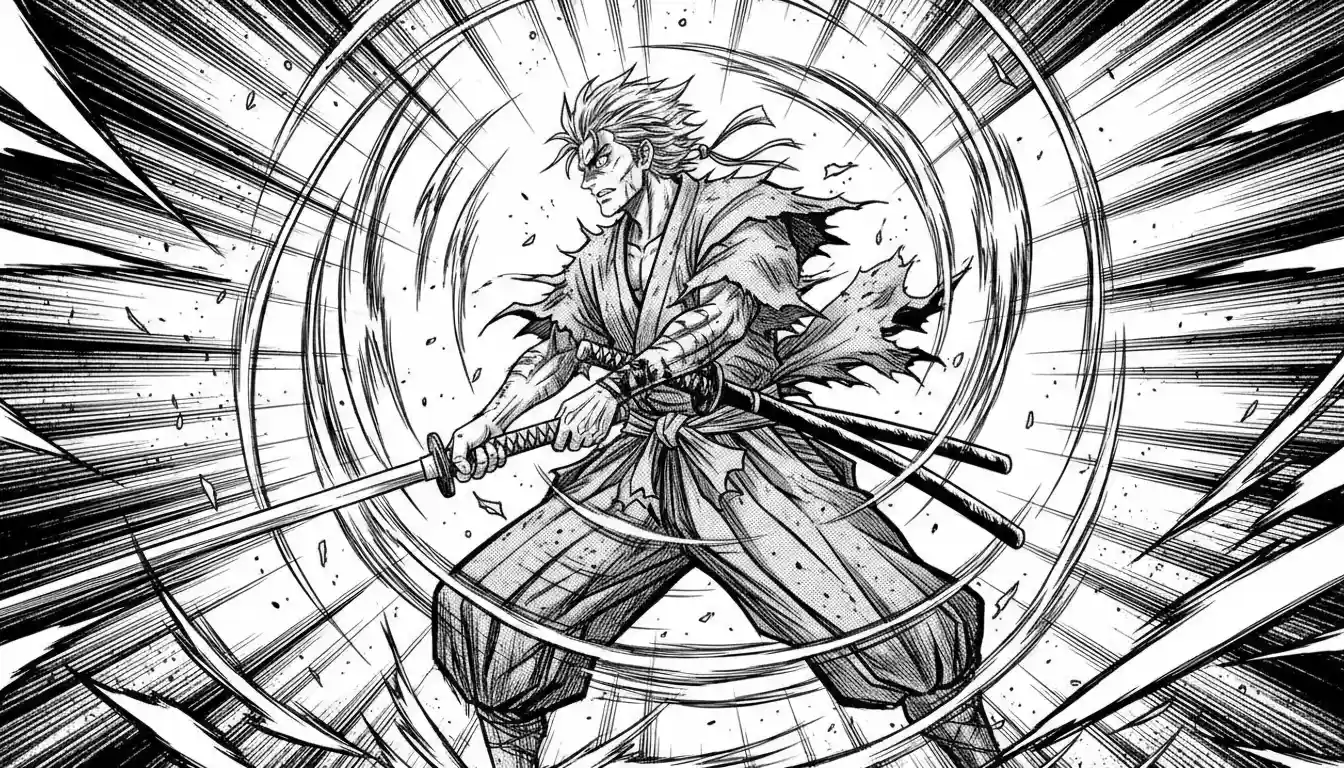
The dramatic, high-energy style of Japanese manga featuring bold ink strokes, speed lines, and intense action sequences.
The Prompt:
Create an animated monochrome manga-style scene showing a lone samurai mid-battle,
partially unsheathing his katana as energy ripples through the air.
The artwork must be strictly black-and-white ink with no grayscale,
using dense screen-tone dot patterns for shadows and depth.
Exaggerated motion blur and sharp speed lines should radiate across the background
to emphasize explosive movement.
The samurai's clothing and hair subtly flutter frame-by-frame,
adding a sense of animation and tension.
High-contrast lighting, dramatic angles, and bold ink strokes
should dominate the composition.
Render in a vertical 2:3 aspect ratio,
maintaining a cinematic manga panel aesthetic.
Key Elements:
- Strict black-and-white ink only
- Screen-tone dot patterns
- Speed lines and motion blur
- High-contrast dramatic lighting
- Dynamic angles
How to Customize:
- Change the character: Replace "samurai" with "martial artist," "mecha pilot," "supernatural warrior," or "street fighter"
- Modify the action: Swap "unsheathing katana" with "throwing a punch," "dodging projectiles," "summoning energy," or "leaping between rooftops"
- Adjust intensity: Add "blood splatter effects," "electrical sparks," or "supernatural auras"
- Environment: Specify "rain-soaked alley," "mountain peak," "destroyed cityscape," or "temple courtyard"
3. Clear Line (Ligne Claire) European Style
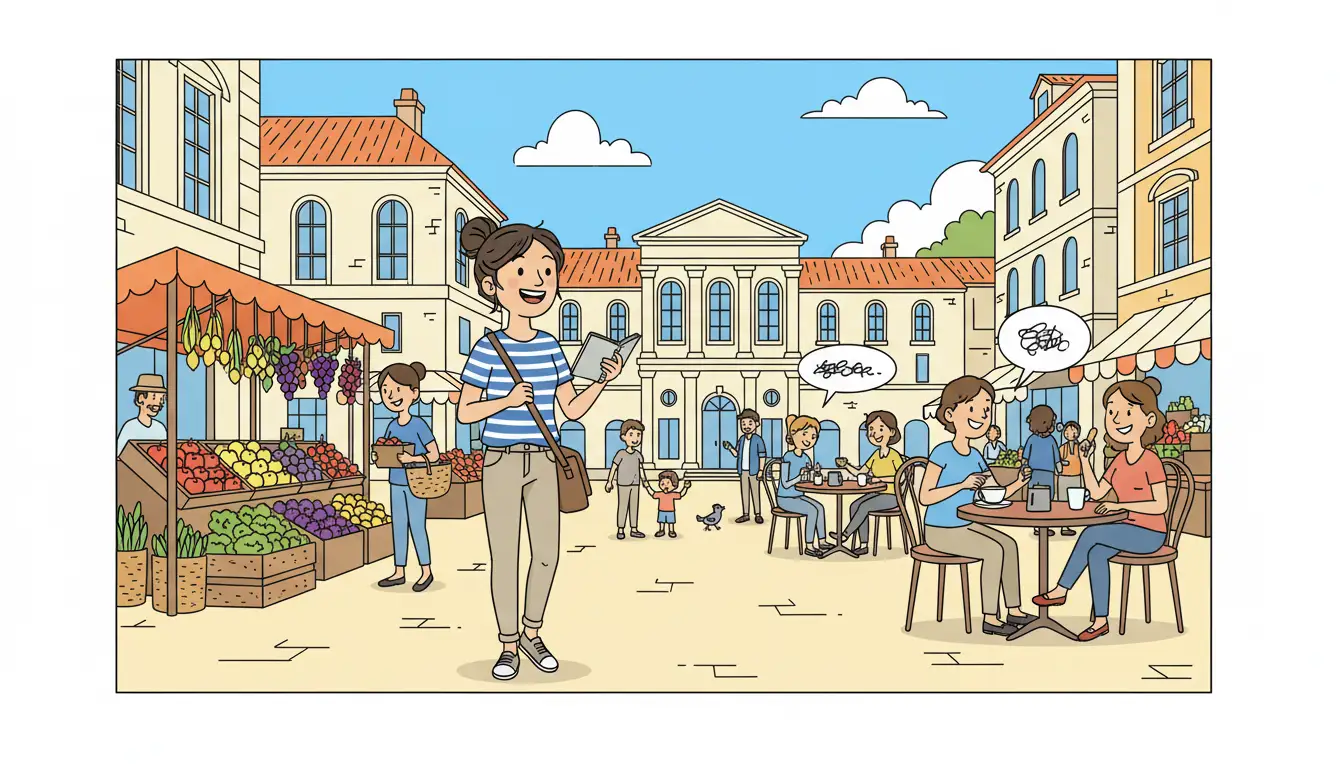
The elegant, timeless style made famous by Tintin and other European comics — featuring clean lines, flat colors, and strong visual clarity.
The Prompt:
Create an animated Clear Line (Ligne Claire) style illustration of a
cheerful young travel sketch artist wandering through a sunny European market square.
The character carries a small sketchbook and shoulder bag,
pausing to observe colorful stalls, café tables, and locals chatting.
Use clean, precise, continuous black outlines
with uniform line thickness for all characters and objects.
Apply flat, vivid, and saturated colors only —
no gradients, textures, or cross-hatching.
The scene should feel lively yet uncluttered,
with strong visual clarity and balanced spacing.
Maintain a crisp, cartoon-like animated look,
composed in a 1:1 square aspect ratio.
Key Elements:
- Clean, uniform line thickness
- Flat, saturated colors
- No gradients or textures
- Uncluttered compositions
- Strong visual clarity
How to Customize:
- Change the character: Replace with "detective," "journalist," "archaeologist," or "young adventurer"
- Modify the setting: Swap "market square" with "harbor dock," "mountain village," "train station," or "countryside vineyard"
- Add adventure elements: Include "mysterious map," "hidden clues," or "unusual characters"
- Time of day: Specify "golden hour sunset," "misty morning," or "twilight evening"
4. Thick-Line Vector Art / Street Style
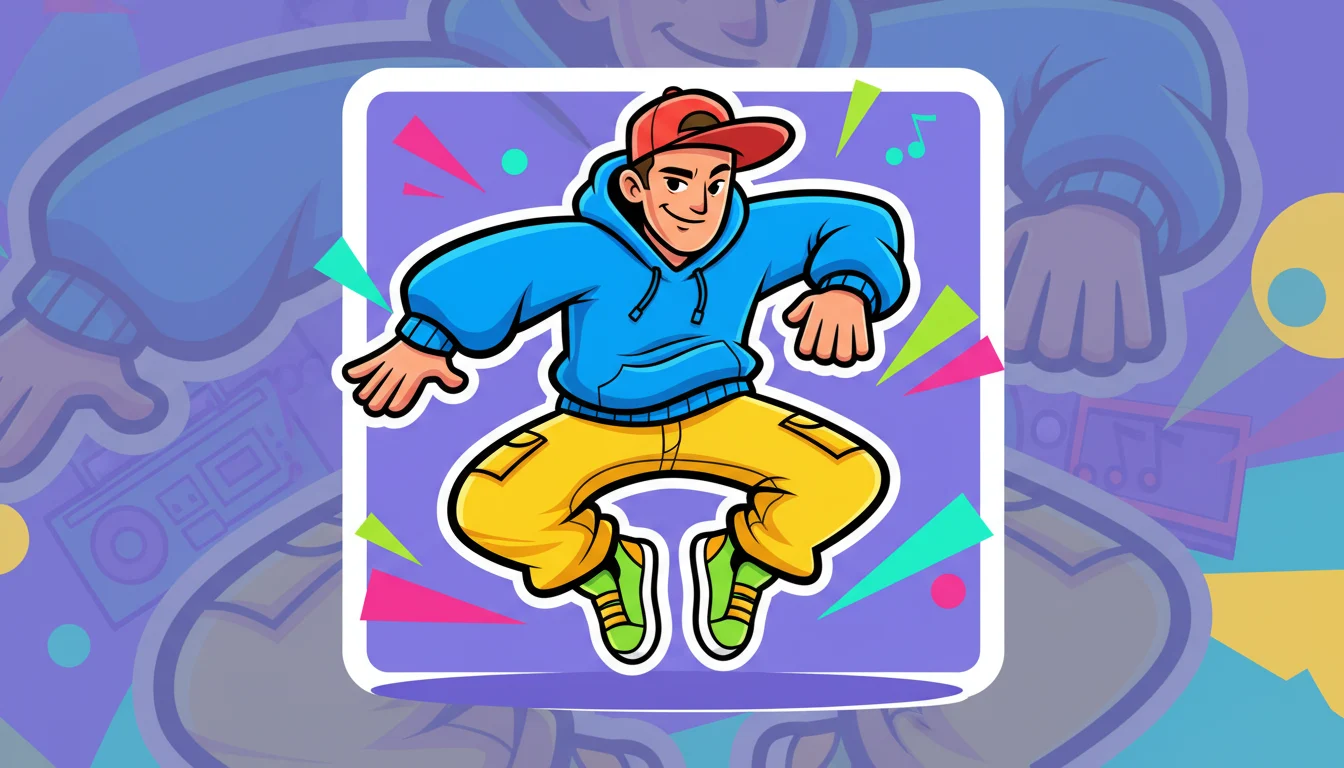
The bold, modern aesthetic of flash animation and sticker art — perfect for social media, merchandise, and contemporary digital content.
The Prompt:
Create a thick-line vector art illustration of a young street dancer
performing a dynamic hip-hop move.
The character should feature extra-bold black outlines,
smooth and clean vector curves,
and an expressive pose that feels energetic and playful.
Use vibrant flat colors with little to no shading,
maintaining a polished animated sticker / flash-animation style.
Add a clean white stroke border around the main character
to make it pop from the background.
The overall look should feel modern, fun, and cartoon-like.
Render in a square 1:1 aspect ratio,
optimized for social media and animation use.
Key Elements:
- Extra-bold black outlines
- Smooth vector curves
- Vibrant flat colors
- White stroke border
- Clean, modern aesthetic
How to Customize:
- Change the activity: Replace "street dancer" with "skateboarder," "basketball player," "graffiti artist," or "parkour athlete"
- Modify the pose: Specify "mid-jump," "freeze pose," "spinning motion," or "power stance"
- Style additions: Add "wearing headphones," "colorful sneakers," "oversized hoodie," or "backwards cap"
- Background options: Include "urban brick wall," "gradient burst," "geometric patterns," or keep it "transparent for stickers"
5. Stop-Motion Claymation Style
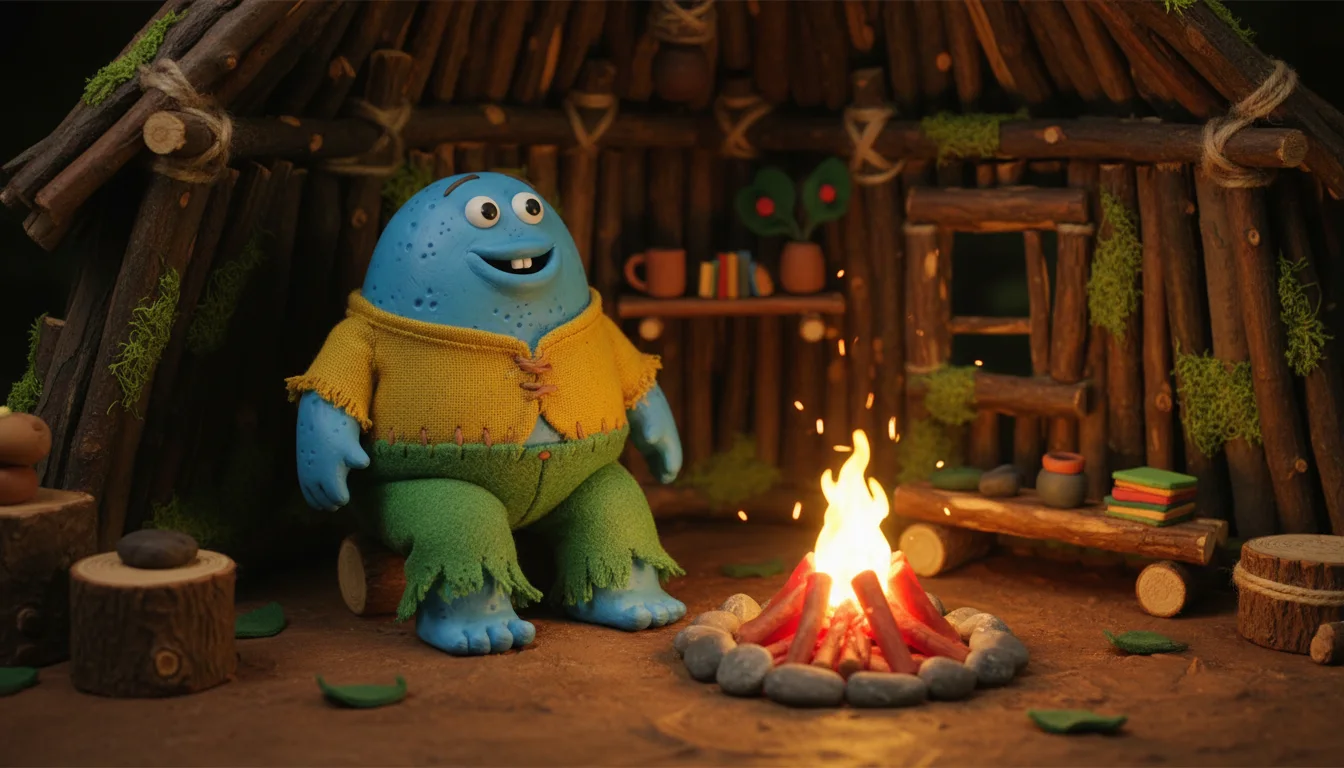
The charming, tactile aesthetic of stop-motion animation like Wallace & Gromit or Coraline — featuring visible handcrafted textures and warm, cozy atmospheres.
The Prompt:
Create a stop-motion claymation style animated scene featuring a
cheerful blue creature sitting beside a glowing campfire inside a small forest hut.
The character should have a handcrafted plasticine/clay texture
with visible fingerprints, dents, and uneven surfaces
to emphasize a handmade feel.
Its outfit should appear stitched from soft felt and fabric,
with slightly fuzzy edges.
The environment should look like a miniature physical set,
including wooden props, moss, and tiny handmade accessories.
Use warm, soft cinematic lighting with gentle shadows,
shallow depth of field, and a cozy atmosphere,
as if filmed in a real stop-motion studio.
Maintain a 16:9 aspect ratio with smooth animation framing
and rich, tactile detail throughout.
Key Elements:
- Visible fingerprints and clay texture
- Handcrafted miniature sets
- Felt and fabric materials
- Warm, soft lighting
- Tactile, physical quality
How to Customize:
- Change the character: Replace "blue creature" with "woodland fox," "friendly monster," "tiny robot," or "whimsical gnome"
- Modify the setting: Swap "forest hut" with "snowy cave," "underwater grotto," "treehouse," or "cozy bakery"
- Add elements: Include "steaming mug," "twinkling fairy lights," "handmade books," or "knitted blankets"
- Mood adjustment: Change to "mysterious and eerie," "bustling and energetic," or "peaceful and meditative"
6. Vintage 1930s Rubber Hose Animation
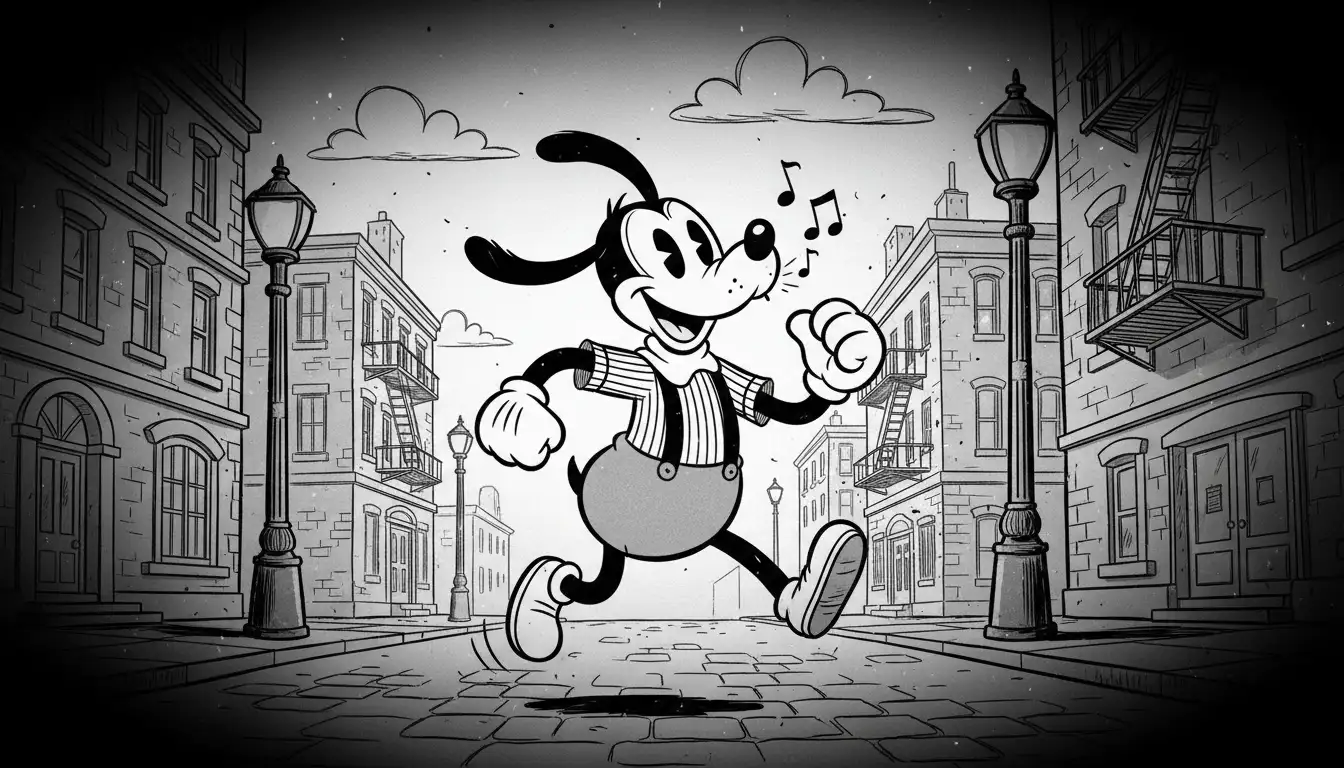
The charming and surreal style of early animation, popularized by Fleischer Studios and early Disney. Think Betty Boop, Cuphead, and classic Mickey Mouse.
The Prompt:
Create a vintage 1930s rubber hose animation style illustration of a
playful anthropomorphic dog wearing suspenders, a striped shirt, and white gloves,
joyfully whistling and skipping on a classic city street
with old-fashioned lampposts and brick buildings.
The character should feature noodle-like limbs with no visible joints,
pie-cut eyes, an oversized smiling mouth, and a simple, rounded body design.
The scene must be black and white only,
with heavy film grain, flickering dust and scratch effects,
subtle frame jitter, and a dark vignette around the edges.
The overall look should feel like a looping hand-drawn cartoon
from the early sound era, maintaining a 1:1 aspect ratio.
Key Elements:
- Noodle-like limbs without joints
- Pie-cut eyes
- Black and white only
- Film grain and scratches
- Frame jitter effect
How to Customize:
- Change the character: Replace "dog" with "cat," "mouse," "rabbit," or "abstract creature"
- Modify the action: Swap "whistling and skipping" with "dancing a jig," "conducting music," "juggling objects," or "riding a penny-farthing bicycle"
- Setting variations: Try "carnival midway," "vaudeville stage," "steamboat deck," or "jazz club"
- Add props: Include "walking cane," "top hat," "musical instrument," or "bundle of flowers"
7. High-Quality 3D CGI / Pixar Style
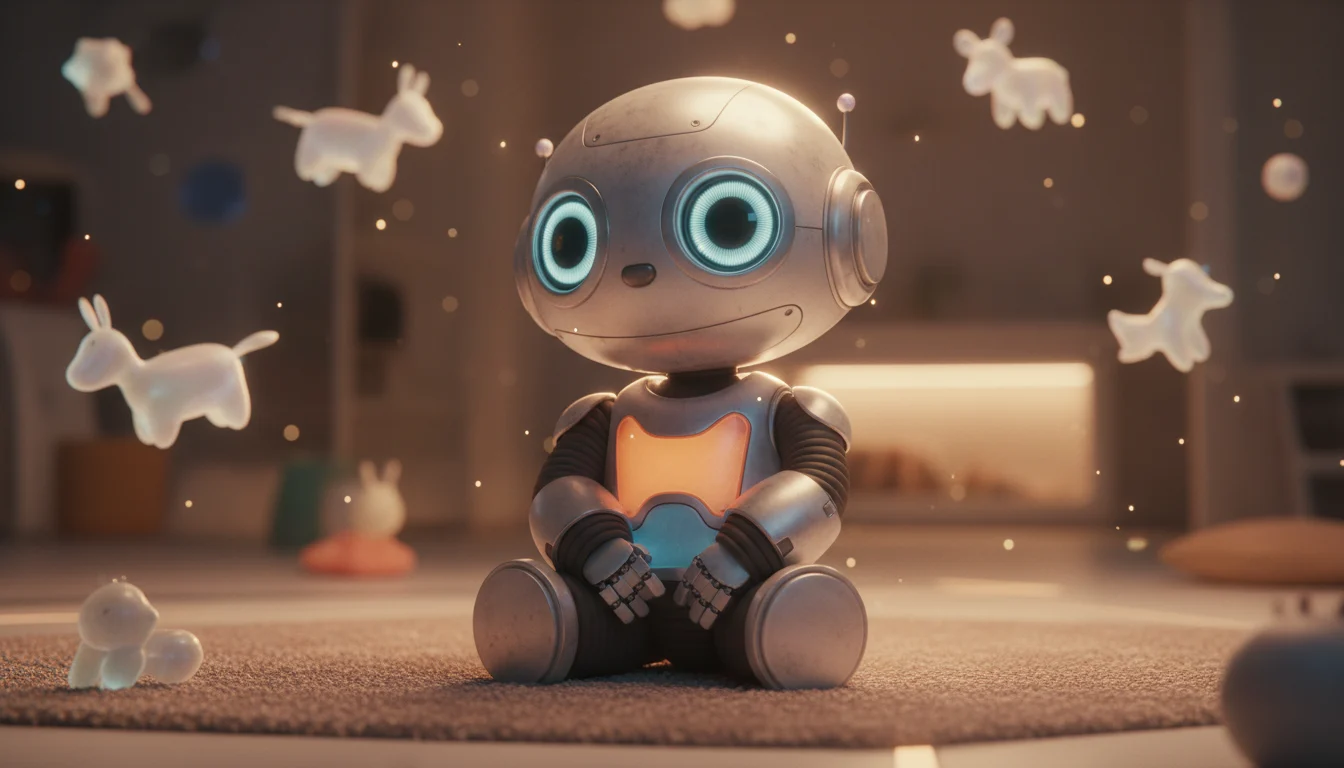
The beloved aesthetic of modern animated films like those from Pixar and Dreamworks — featuring ultra-detailed materials, cinematic lighting, and heartwarming character design.
The Prompt:
Create a high-quality animated 3D CGI render of a tiny, lovable companion robot
with rounded proportions and glowing LED eyes,
placed inside a cozy, futuristic playroom
filled with soft holographic toys and floating light elements.
The robot should have ultra-detailed materials,
including lightly scratched alloy surfaces, rubberized joints,
and translucent polymer panels with realistic subsurface scattering.
Apply warm, diffused cinematic lighting with subtle rim light to enhance depth,
along with a shallow depth of field for a dreamy, animated-film look.
Maintain a polished Pixar-style realism with smooth motion-ready design,
rendered in a cinematic 2:1 aspect ratio.
Key Elements:
- Ultra-detailed materials
- Subsurface scattering
- Cinematic lighting
- Shallow depth of field
- Polished, film-quality render
How to Customize:
- Change the character: Replace "companion robot" with "alien creature," "fantasy pet," "magical artifact," or "sentient toy"
- Modify the setting: Swap "playroom" with "forest clearing," "space station," "enchanted library," or "underwater cave"
- Material changes: Specify "wooden textures," "crystalline surfaces," "organic bio-luminescence," or "weathered metal"
- Lighting mood: Try "moody blue moonlight," "warm golden hour," "neon cyberpunk," or "ethereal magical glow"
8. Layered Paper Cut-Out Animation
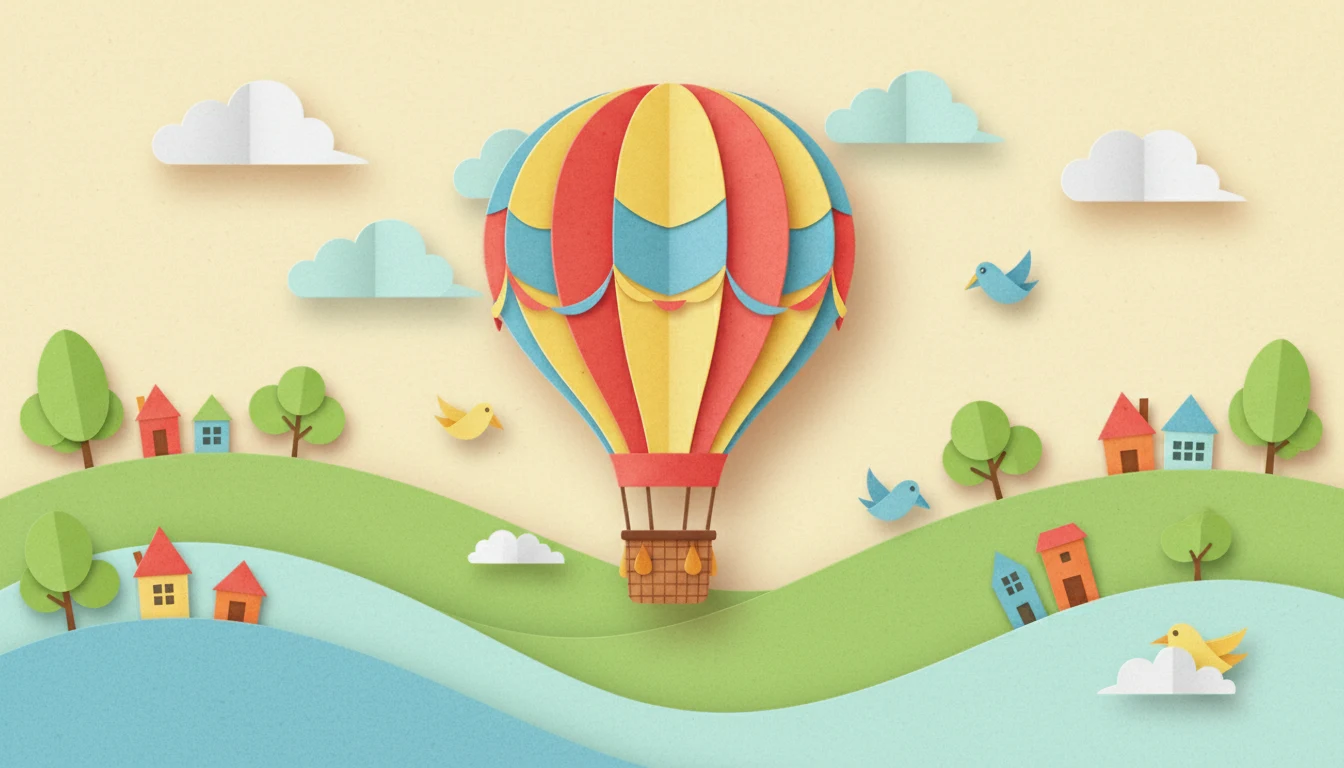
The whimsical, storybook aesthetic of paper craft animation — featuring visible scissor-cut edges, layered depth, and playful color palettes.
The Prompt:
Create an animated digital illustration in a layered paper cut-out style.
The scene shows a hot air balloon drifting above a whimsical landscape
with rolling hills, clouds, and small houses below.
Every element — balloon, clouds, trees, birds, and terrain —
should appear as hand-cut construction paper layers,
with visible scissor-cut edges, soft textures,
and gentle drop shadows to create depth.
Use a bright, playful color palette
with warm yellows, soft reds, and pastel blues.
Add subtle animation such as slowly moving clouds,
gently swaying trees, and the balloon floating smoothly.
Maintain a 16:9 aspect ratio
with a clean, storybook-style composition.
Key Elements:
- Hand-cut paper appearance
- Visible scissor-cut edges
- Layered depth with shadows
- Bright, playful colors
- Gentle animation
How to Customize:
- Change the subject: Replace "hot air balloon" with "sailing ship," "flying whale," "magical carpet," or "paper airplane"
- Modify the landscape: Try "ocean with islands," "desert with dunes," "snowy mountains," or "autumn forest"
- Color palette: Swap to "cool blues and purples," "earth tones," "monochromatic pastels," or "vibrant tropical colors"
- Add elements: Include "paper birds," "cloud shapes," "stars and moon," or "rainbow arcs"
9. Designer Vinyl Toy / Collectible Style
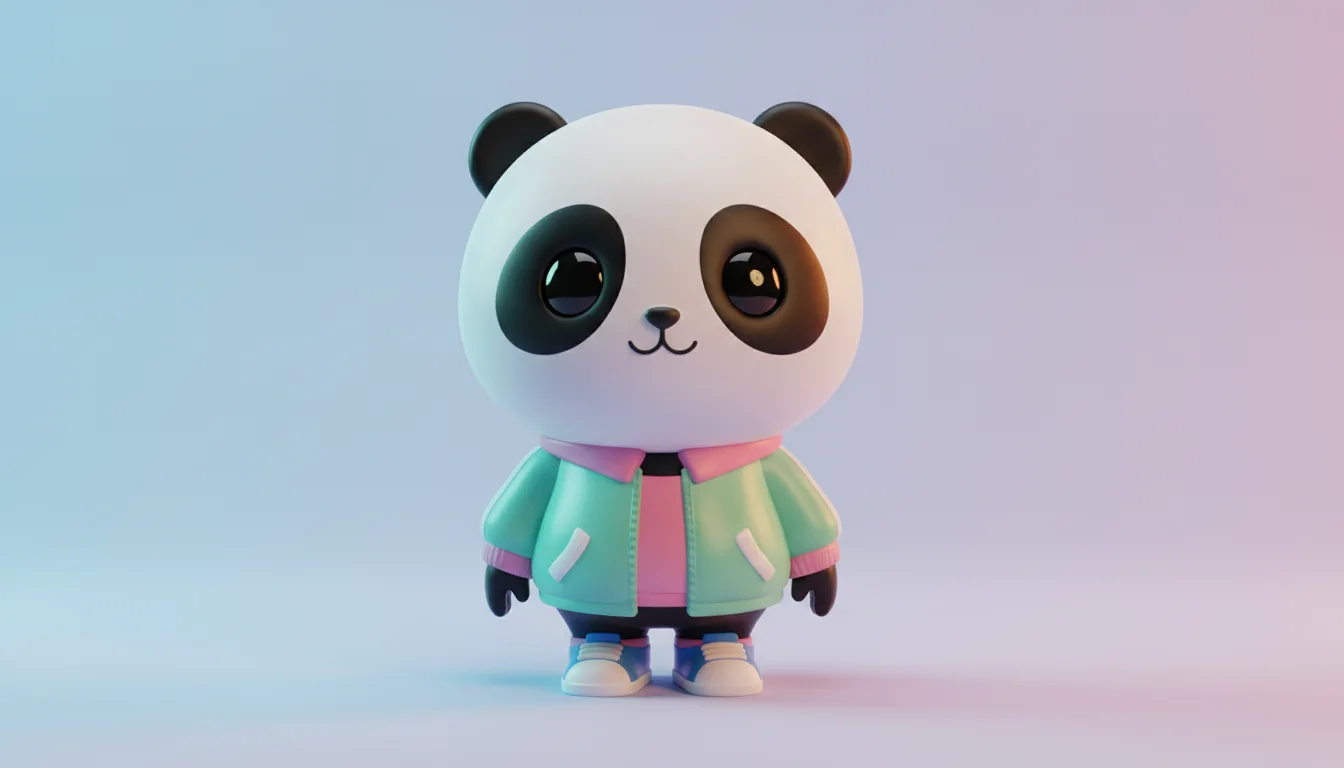
The trendy aesthetic of premium designer toys and collectible figures — featuring oversized proportions, glossy materials, and minimal detailing.
The Prompt:
Create an animated 3D render of a cute, collectible vinyl-style character
inspired by a playful panda mascot.
The panda has an oversized head, tiny body proportions, and expressive eyes.
It is wearing a casual streetwear jacket with sneakers,
giving a modern, youthful vibe.
The material should look like smooth, glossy molded plastic
with soft reflections, rounded forms, and minimal detailing,
similar to premium designer toys.
Use clean, simple color blocking with subtle highlights.
Place the character in a seamless soft-gradient pastel studio background
with gentle ambient lighting.
Render in high quality, centered composition,
square 1:1 aspect ratio, animated aesthetic.
Key Elements:
- Oversized head proportions
- Glossy molded plastic look
- Simple color blocking
- Minimal detailing
- Studio background
How to Customize:
- Change the character: Replace "panda" with "bear," "rabbit," "cat," "alien," or "robot"
- Modify the outfit: Try "space suit," "traditional kimono," "superhero costume," "chef's uniform," or "winter gear"
- Style variations: Add "battle-damaged effects," "transparent sections," "metallic accents," or "glow-in-the-dark elements"
- Background: Swap to "geometric patterns," "branded backdrop," "cityscape silhouette," or "splash effects"
10. Rough Ballpoint Pen Doodle / Notebook Style
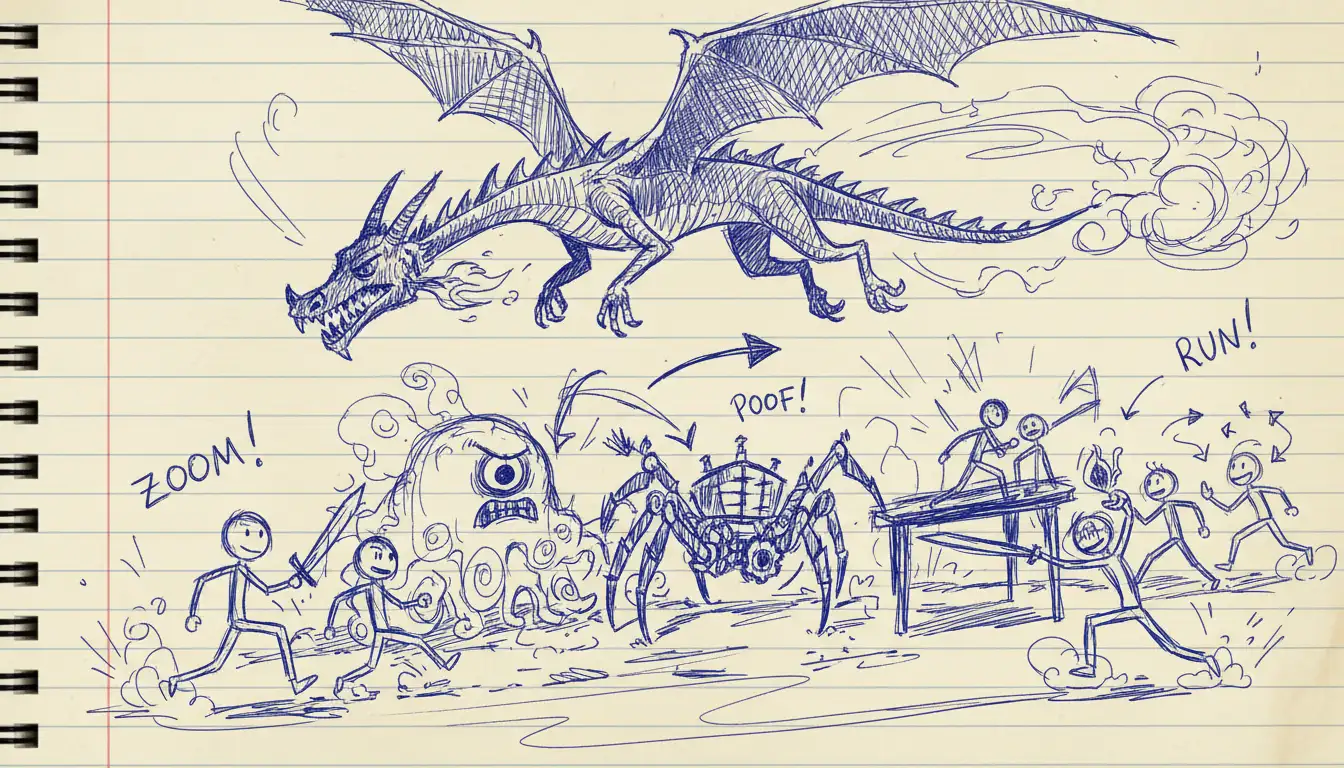
The playful, spontaneous aesthetic of classroom doodles — featuring messy ink lines, notebook paper texture, and hand-drawn action marks.
The Prompt:
Create an animated rough ballpoint-pen doodle illustration on lined notebook paper.
The scene shows a frantic classroom-style fantasy chase
where stick-figure heroes are escaping from oversized sketchy creatures
like a flying dragon, a one-eyed blob monster, and a mechanical spider.
Draw everything in messy, uneven blue-ink lines
with visible pen pressure, cross-hatching, and random scribbles,
as if drawn absent-mindedly during a boring lecture.
Add subtle animation such as shaking lines, wiggling characters,
motion arrows, dust clouds, and hand-drawn action marks
to bring the doodle to life.
Maintain a playful, chaotic, hand-sketched feel
in a vertical 3:4 aspect ratio,
preserving the imperfect notebook aesthetic.
Key Elements:
- Messy, uneven lines
- Blue ink appearance
- Visible pen pressure
- Hand-drawn action marks
- Notebook paper texture
How to Customize:
- Change the scenario: Replace "fantasy chase" with "space battle," "underwater adventure," "zombie apocalypse," or "sports competition"
- Modify the characters: Try "superheroes," "ninjas," "pirates," "robots," or "mythical creatures"
- Paper style: Swap to "graph paper," "coffee-stained paper," "torn edges," or "margin doodles"
- Ink color: Change "blue ink" to "black pen," "red ink," or "mixed colors"
Understanding Different Cartoon Style Categories
Now that you have the prompts, let's dive deeper into the major cartoon style families and what makes each unique:
Traditional 2D Hand-Drawn Styles
Classic American Animation:
- Golden Age (1930s-1940s): Rubber hose animation, pie-cut eyes, exaggerated movements
- Limited Animation (1960s-1980s): Simplified designs, held frames, cost-effective techniques
- Contemporary Sitcom (1990s-present): Rough lines, satirical humor, adult themes
Japanese Anime/Manga:
- Shonen: Action-focused, speed lines, dramatic poses
- Shojo: Soft features, sparkles, emotional expression
- Seinen: Mature themes, detailed linework, realistic proportions
European Comics:
- Ligne Claire: Clean lines, flat colors, visual clarity (Tintin style)
- Bande Dessinée: Detailed backgrounds, expressive characters
- Eastern European: Surreal, artistic, experimental
Digital Vector Styles
Flat Design:
- Bold outlines
- Minimal shading
- Geometric shapes
- Limited color palettes
Flash Animation Style:
- Smooth vector curves
- Clean edges
- Optimized for web animation
- Simplified motion
Sticker/Icon Style:
- Extra thick outlines
- High contrast
- Simplified details
- Social media friendly
3D CGI Styles
Photorealistic:
- Detailed textures
- Complex lighting
- Accurate physics
- Film-quality renders
Stylized 3D:
- Exaggerated proportions
- Simplified textures
- Artistic lighting
- Hybrid 2D/3D look
Low-Poly:
- Geometric facets
- Minimal polygons
- Retro gaming aesthetic
- Abstract simplification
Mixed Media & Experimental
Stop-Motion:
- Claymation
- Puppet animation
- Object animation
- Cut-out animation
Paper Craft:
- Layered depth
- Cut-out aesthetics
- Shadow play
- Tactile textures
Sketch/Doodle:
- Hand-drawn feel
- Imperfect lines
- Spontaneous marks
- Raw creativity
Pro Tips for Editing Prompts
1. Character Customization
- Physical traits: Age, body type, clothing, accessories
- Personality indicators: Posture, expression, gestures
- Cultural elements: Traditional wear, regional styles, historical periods
2. Setting Modifications
- Environment: Indoor/outdoor, urban/rural, realistic/fantasy
- Time period: Historical era, contemporary, futuristic
- Atmosphere: Lighting, weather, mood, time of day
3. Technical Adjustments
- Aspect ratio: 16:9 (widescreen), 1:1 (square), 9:16 (vertical), 2:3 (portrait)
- Resolution: "High quality," "4K render," "optimized for web"
- Camera angles: "Bird's eye view," "low angle," "Dutch tilt," "over-the-shoulder"
4. Style Intensity
- Mild: "Subtle textures," "gentle shading," "slight exaggeration"
- Moderate: Standard descriptors
- Extreme: "Highly exaggerated," "ultra-detailed," "hyper-stylized"
5. Animation-Specific Elements
- Motion: "Mid-action," "motion blur," "frame-by-frame flutter"
- Effects: "Speed lines," "dust clouds," "energy ripples," "sparkles"
- Timing indicators: "Slow-motion," "rapid movement," "gentle sway"
Combining Styles: Advanced Techniques
Want to create something truly unique? Try blending elements from different prompts:
Example Combinations:
- Manga + 3D CGI: "Anime-style character with photorealistic 3D rendering"
- Stop-Motion + Vector: "Claymation character with flat, graphic design elements"
- Rubber Hose + Modern: "1930s animation style but with contemporary colors and themes"
- Paper Craft + Doodle: "Cut-out aesthetic with hand-drawn sketch textures"
Start Creating Today
Now that you have access to these 10 professional cartoon-style prompts, it's time to bring your creative vision to life. Whether you're creating profile pictures, social media content, or unique art projects, the AI Cartoon Generator lets you upload a photo, choose a style, and cartoonize it without copying a prompt first.
Getting Started is Easy
- Choose your cartoon style — Pick any prompt from this guide that matches your creative goal
- Upload your image — Use a clear, well-lit photo for best results
- Customize the prompt — Use the "How to Customize" tips to make it your own
- Generate & download — Get professional cartoon art in seconds
Turn Your Photo into a Cartoon →
What You Get:
- Access to all 10 cartoon style templates
- Multiple animation and art style options
- Fast generation (under 30 seconds)
- High-resolution outputs (up to 4K)
- Unlimited customization options
- Perfect for social media, print, and merchandise
New to Nano Banana Pro? All users receive registration credits to explore and experiment with different cartoon styles.
Need Help or Have Questions?
- Email us: support@nano-banana-pro.ai
- Quick questions? Check out our FAQ page
- Explore more: Browse our Style Templates for inspiration
Frequently Asked Questions
Q: Which cartoon style works best for profile pictures? A: The Designer Vinyl Toy style and 3D CGI Pixar style are most popular for profile pictures because they're universally appealing and create eye-catching, polished results.
Q: Can I use these cartoon transformations commercially? A: Yes! All generated images include full commercial usage rights.
Q: How do I get the best results from these prompts? A: Use clear, well-lit photos with simple backgrounds. Follow the "How to Customize" tips to tailor each prompt to your specific needs.
Q: Do these styles work for group photos? A: Yes, but results are best with 1-3 people. For larger groups, consider individual transformations.
Q: Can I combine multiple cartoon styles? A: Absolutely! Try combining elements from different styles for unique results. See the "Combining Styles" section for examples.
Pro Tip: Bookmark this guide for quick reference. The best cartoon results come from experimenting with different styles and finding what works for your unique creative vision.
Try the AI Cartoon Generator →
Related Articles:
- 45+ Best AI Image Prompts Guide
- How to Use Nano Banana Pro: Complete Guide
- Gender Swap Filter: Complete Tutorial
- 30+ Black and White Portrait Prompts
Need Help? Contact our support team or check our FAQ section for more information.
Related Posts

Gender Swap Filter: See Yourself as the Opposite Gender in Seconds
Ever wondered what you'd look like as the opposite gender? Transform your portrait with Nano Banana Pro's AI Gender Swap Filter. Natural results in 10 seconds. Try it free!
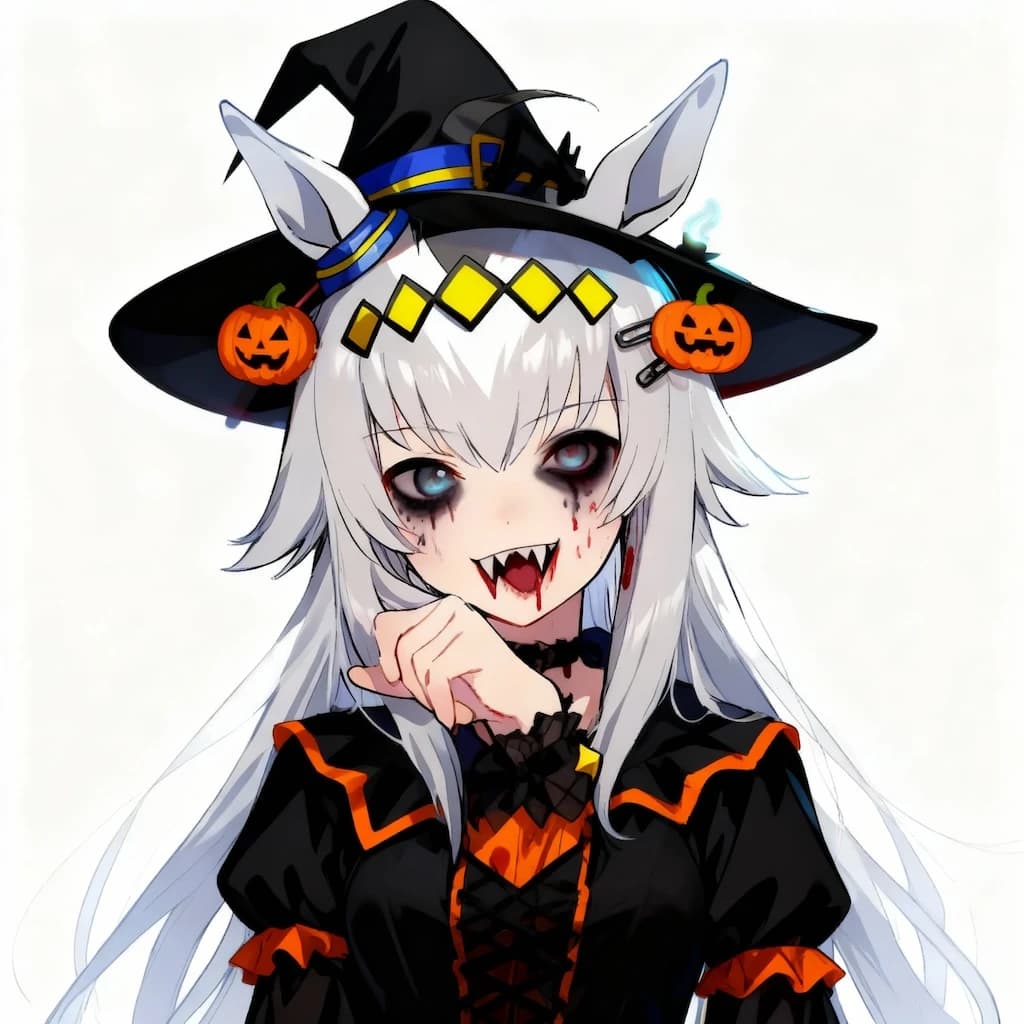
AI Halloween Costume Generator: Transform Your Photos in Seconds
Transform photos into Halloween costumes with Nano Banana Pro. Add spooky makeup, vampire fangs, witch hats, zombie effects in seconds. Try now!